 Unity Asset - BG Database v1.7.4
  3dsfree PRO models December 3 2020
  Unity Asset – Space Graphics Planets v4.0.3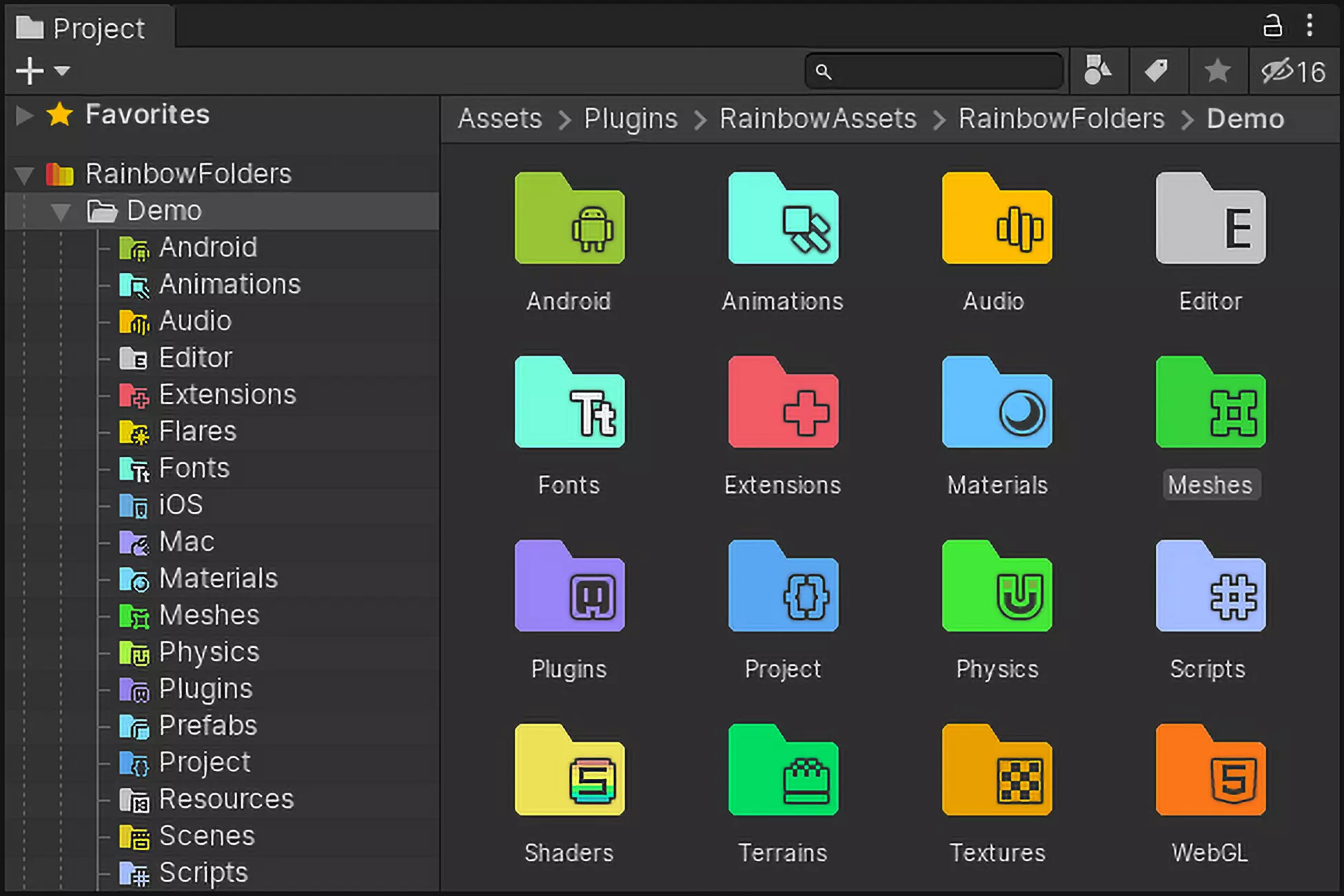
Description
Have you ever thought about highlighting often used project folders? This simple but colorful asset allows you to do that!
With Rainbow Folders, you can set a custom icon and background for any folder in the Unity project browser.
Just hold the Alt key and click on any of your folders. A configuration dialog will appear, and you’ll be able to assign a custom icon and background for it, your own one, or choose from dozens of presets!
Features:
• Change icon and background for any folder in the Project window.
• Change icon or background for multiple folders at once
• Apply custom icon and background for all subfolders automatically
• Optional row shading and project tree outlines
• More than 70 pre-made icons included
• Source code included
Want the same for the hierarchy window? Just grab it here!
Please note:
• Beta versions of Unity Editor are not officially supported. This asset heavily relies on internal Editor API. Usually, it works fine. However, on major changes in Editor, it takes some time to make him functional again.
• Unity Collaborate and Unity Version Control overlays are not supported starting from Unity 2020.1+